EDU 632 Unit 5 Blog

            Over the past two weeks I have been learning how to navigate the Learning Management Systems (LMS) of Blackboard (original version) and Canvas.  The first week was Blackboard where I learned how to build a simple course so there will be one paragraph.  The second paragraph will be about the Canvas LMS which is new to me so I will then give some examples of similar and different uses for each program.  The last area to review will be how I expect to use or not use either of the systems.  I hope this will prove to be informative in case someone has the option to choose which system they can use to teach in.

            Blackboard, once I created an id within using blackboard from Learn Educator Preview, which by the way must be created as an instructor and not a student, I was ready to begin.  I already wrote out a mock course I wanted to teach so all I had to do was to enter in the information.  I had read all the information and watched videos, so I was confident and started to load just by a simple click, type in the box and submit.  The instructions given to create everything from Forums, links, content areas, assignments, and tests seemed very simple to navigate but there was too much scrolling.  If there was too much information I had to keep scrolling down to see more.  There is a new system called Ultra Blackboard which seemed easier but to create the course we had to pick one.  However, Blackboard offers excellent videos to talk you through what every topic is needed and easy to follow.  I was able to load in the information quickly without much distress.

            Canvas was something that I have never seen before.  This LMS is cloud based, moves much faster than Blackboard and does not need to scroll.  Set up is similar with a few word changes such as home screen is now called dashboard.  Personal profile set ups are similar in set up as well typing in information but the real difference for me is how everything is laid out.  There are tabs, tiles, to do features and much more on your dashboard to prevent scrolling.  The best feature is in reference to Canvas creating assessments in outcome where an assignment can be read, marked up, graded, and posted from one screen.  There is also a capability of offering a Mastery Path to individualize learning. I also appreciated that a student could be notified about emails by simply changing their own preferences on how be contacted.  Blackboard does not have this.  If I need to check emails I have to remember to look, which I usually do not.  The downfall is the only help available is within the LMS itself.  I found very little videos to watch unless wanted a representative from the company to schedule a demo.  I prefer to watch and learn at my own pace, so this was a problem but the rest of the LMS seemed easier to use.

I found two videos with the top differences between Blackboard and Canvas (Faculty Lfgsm, 2018; May, 2017). Both of these were very informative and quick to view.

            At this point I have only discussed the uses of the systems for educational purposes within a school or university since that is what I am familiar with however there are many ways to use them within a corporation.  I did not find much for Blackboard business that was visually different from academic.  Set up seems the same but tracking is a weighted management system with certificates of completion available.  Canvas seemed to be the winner with corporations.  Brighter and easier to use.  Did not go into it very deeply but I found a comparison website (Capterra, nd).

            In the future If I was able to choose which system to use, I would believe Canvas or Ultra Blackboard would be the ones to use.  The classic Blackboard seems outdated.  Guess I should have included Ultra in the comparison……That may be another Blog.

References:

Capterra (n.d.). Blackboard LMS for Business vs Canvas (website). Retrieved from https://www.capterra.com/learning-management-system-software/compare/14500-127214/Blackboard-LMS-for-Business-vs-CANVAS

Faculty Lfgsm (2018, Apr 25). Blackboard vs. Canvas (video). Retrieved from https://youtu.be/xrKFRaQfRuo

May, J. (2017, Jul 25). Five things: Blackboard Vs. Canvas (video). Retrieved from https://youtu.be/HrzCJ_6OtRM

Published by Lynette Markey on April 11, 2020

EDU 632 Unit 3 Blog

The next few series of blog entries will be about evaluating learning management systems or LMS for short.  This will be separated into a four- part series.  The first one is in reference to the first two weeks that I have been learning about LMS such as what it is, how they work, some differences between different types as well as features to make them unique.  I will be adding a few personal reflections on each area as well as my personal look into the future on how a learning management system will work for me on my educational journey to online teaching.

            What is a learning management system?  How is it used? Who uses this system?  What I learned from the first two weeks working with LMS is a software application or web-based system used to create, implement and assess a specific learning process (Rouse, n.d.).  Rouse suggests it is used for eLearning and consists of two parts:  A server and a user which is usually used by instructors, students, and administrators (Rouse, n.d.). 

            How to use the LMS is dependent on who you are.  According to Rice (2012), there can be corporate or academic uses as well as content-based systems.  Each area can use the system, but each is unique to itself. To begin I will look at the corporate use of an LMS.  A corporation may want to use the system for training, I have been through this with many companies.  Using this approach allows the company to deliver learning programs that they can control with administrators creating a scheduled time, content, and completion of a topic, such as harassment training.  A corporate LMS targets business organizations.  The other type targets Academic areas used by schools.  This is different from corporate because it is used for delivering learning online with a graded result.  This is like corporate with a passing grade but differs since there is interaction with a professor and student via discussion boards, learning goals, and in some cases web conferencing.  

            The last area to review is LCMS-LMS.  This is a combination of Learning Content Management System LCMS and learning management systems LMS.  A bit confusing, YES!  LCMS is learning management system with content.  This area does not create a specific course for a person to take and be graded on, but it gives a person just enough information to understand and is used mostly by organizations that make their own instructional programs. 

            OK, now that the basics are covered it may be helpful to discuss what I plan on doing with all this information.  My educational journey is to achieve my Master of Education in online learning with the hopes of teaching, online, well after my retirement years.  The medium used seems to be Blackboard which is an established LMS.  I personally have not had any experience creating a course within Blackboard but as a student have used this for many years.  I need to flip from being a student to being an educator and therefor, learn how Blackboard works. What type of online teacher do I want to be?


Since the university I hope to work for uses Blackboard, I will need to understand how to add a course module when needed.  The course set up requires a new set of learning which will include how to create everything like the home page, content, discussion boards, gradebook and so much more.  If I am lucky the class is already created but there will come a time when one may need to be created from scratch. 

            Looking ahead I know from being a student online that some classes have issues such as broken links for readings and videos, outdated material, information that is just not relevant to the course.  As an instructor I hope to have enough time to open the class to be taught, open each link, verify that it all works before I begin.  Only then can a course run smoothly and hopefully with confidence that all students will succeed. See the following video if they do not.


Milne, J. (2020, Jan 1). 5 mistakes online teachers make

Resources:

Milne, J. (2020, Jan 1). 5 mistakes online teachers make . Retrieved from https://www.youtube.com/watch?v=P0od65Nv7F4

Rice, W. (2012). Blackboard essentials for teachers : Build and deliver great courses using this popular learning management system. Birmingham: Packt Publishing.  Chapters 2-4

Rouse, M. (n.d.). learning management systems (LMS). Retrieved from https://searchcio.techtarget.com/definition/learning-management-system

Published by Lynette Markey on March 28, 2020

EDU520 Video Reflection

Published by Lynette Markey

References:

CoolToolsForSchools (2018). Thing 6: Digital storytelling. Retrieved from http://www.cooltoolsfor school.net/digital-storytelling/

Digital Chalk (2014, Jun 23). Pros and cons of using video in eLearning [Blog]. Retrieved from http://www.digitalchalk.com/resources/blog/tips-and-tricks/pros-and-cons-of-using-video-in-elearning

Dinmore, S. (2019). Beyond lecture capture: Creating digital video content for online learning – a case study. Journal of University Teaching & Learning Practice, 16(1), 1-10.

Published by Lynette Markey on February 23, 2020

Personal Digital Citizenship Statement

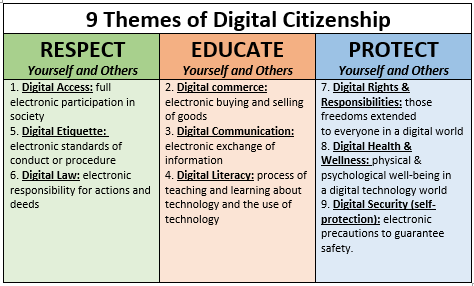
Digital Citizenship is important for all generations to learn and master.  The youth of today were born connected to technology, but do they know how to use it?  Have they been taught the do’s and don’ts?  Educators of today need to place emphasis on teaching students the Nine Themes of Digital Citizenship which are digital etiquette, digital communication, digital literacy, digital access, digital commerce, digital law, digital rights & responsibilities, digital health & wellness, and digital security (self-protection).

Why is this important?  According to Holmes (2017), she mentions three main reasons.  The first is to teach smart online behavior it is important that students learn how to cite other people’s work and never take credit for information as their own. The second is to prep students for the working world.  Almost all jobs today is touched by technology.  Students need to learn how to collect data, images, and resources which are proper for the workplace.  The third is to learn empathy.  I hope by now cyberbullying has slowed down, but youth need to learn online digital etiquette right away know that words hurt and how to be online appropriate.

  By following the three mentioned principles of digital citizenship, Respect – Educate – Protect, one of my educational goals in life can be fulfilled which is to help equip students with what they need to master the online world they live in. I believe remembering three things is easier than nine and the following chart makes it so much easier.

Copyright (Ingham, M.W., Kalamazoo, T. T., Macomb, J. H. & Shiawassee, V. C., 2015)

What is information privacy?  The simple definition is it is a collection of your personal data stored on a computer.  This information could be from medical records, banking, political, criminal, or even places of business.  The question is how do we protect ourselves.  This area falls under the 9th theme of digital citizenship about digital security. 

Since the review of information privacy is defined if we look at copyrights this is a way to also protect your information privacy but in a different form.  Dictionary.com defines copyright as “the exclusive right to make copies, license, exploit a literary, musical, or artwork, printed or audio video etc.” (Dictionary.com, 2020, para. 1). Unlike our privacy information there is a law that states the author of said pieces is protected for their lifetime and 70 years after death.  Interesting thought, why can’t we copyright our identities?  The answer is no!  According to Gardiner (2016), a copyright is only given to a man-made creative work. 

If everyone can just be responsible with technology and help students understand how to use the 9 themes of digital citizenship the future and partnership with the technological world will be bright.  But not all of the themes have been perfected yet.  I would like to see people be able to copyright their images as well as their personal information and it can only be seen or used without permission till long after we are gone.

Resources:

Dictionary.com (2020). Copyright. Retrieved on February 14, 2020 from https://www.dictionary.com/browse/copyright

Gardiner, T. (2016, Jun 14). Can you copyright your own face? [Blog]. Retrieved from https://www.quora.com/Can-you-copyright-your-own-face

Holmes, C. (2017, Oct 12). 3 Big Reasons You Need to Teach Digital Citizenship in CTE. Retrieved from https://www.aeseducation.com/blog/teaching-digital-citizenship-in-cte

Ingham, M. W., Kalamazoo, T. T., Macomb. J. H., & Shiawassee, V. C. (2015). 9 Themes of Digital Citizenship [chart]. Retrieved from http://21things4teachers.net/21-Things/08/index.html

Published on February 15, 2020 by Lynette Markey

EDU520 First Reflective Blog

Blogging, what is this exactly?  Why is it any different from sending a text message to some one you want to talk to?  After watching the video eLearning Bloggers’ Masterclass – Finding your voice for your blog through writing (Kidspot, 2014), I realized the difference.  A blog is about what you are thinking about today and is really not directed at any person in general.  It is what is on your mind as long as you don’t overthink what your write and you tell the truth then the Blog is successful.

I found an article that tells you simply Your blog Posts are Boring:  9 tips for making your writing more interesting (Patel, 2017)What I noticed was to write in a blog format you are supposed to write in the first person.  Funny since all college work is written in the third person.

An assignment was given to review the online identities of two people and analyze them.  The two people I chose were very professional in every social avenue I looked at.  No inappropriate comments or pictures.  This made me think about how I would like to reflect myself within my PLE.  If Blogging is sending a message to anyone who reads it then how do I want to be perceived as an individual who writes in a Blog.  Interesting question to be reviewed.

References:

Kidspot (2014, Oct 8). eLearning Bloggers’ Masterclass – Finding your voice for your blog through writing . Retrieved from https://www.youtube.com/watch?v=1m70uHV7uYU Patel, N. (2017, Jul 8). Your blog Posts are Boring:  9 tips for making your writing more interesting [Blog]. Retrieved from https://blog.hubspot.com/marketing/how-to-write-interesting-content

Published January 29, 2020 by Lynette Markey

My First Blog Post

Introducing Myself

My name is Lynette Markey and I have been married to my wonderful husband for 35 years. I have four children and 7 grandchildren. Three of my children went to the military life, two in the Navy and one in the Air Force. Only one is still active duty. I have three dogs, a parrot, and I love my fish.

Currently I am employed as a Claims document Processor for an insurance company.  I have been with the company for over five years, only part time.

I have decided to continue my educational journey for my Master of Education at this time since I am approaching retirement age. In the future I would like to become an online professor.

My favorite saying comes from Lance Armstrong:  I take nothing for granted.  I only have good days or great days.

Be yourself; Everyone else is already taken.

— Oscar Wilde.
Design a site like this with WordPress.com
Get started