My name is Lynette Markey and I have been married to my wonderful husband for 35 years. I have four children and 7 grandchildren. Three of my children went to the military life, two in the Navy and one in the Air Force. Only one is still active duty. I have three dogs, a parrot, and I love my fish.
Currently I am employed as a Claims document Processor for an insurance company. I have been with the company for over five years, only part time.
I have decided to continue my educational journey for my Master of Education at this time since I am approaching retirement age. In the future I would like to become an online professor.
My favorite saying comes from Lance Armstrong: I take nothing for granted. I only have good days or great days.
For my Blog I would like to discuss Open Educational Resources (OERs) and Multi-Device and Mobile Learning. I will review some examples of each and review how they are becoming trends in learning.
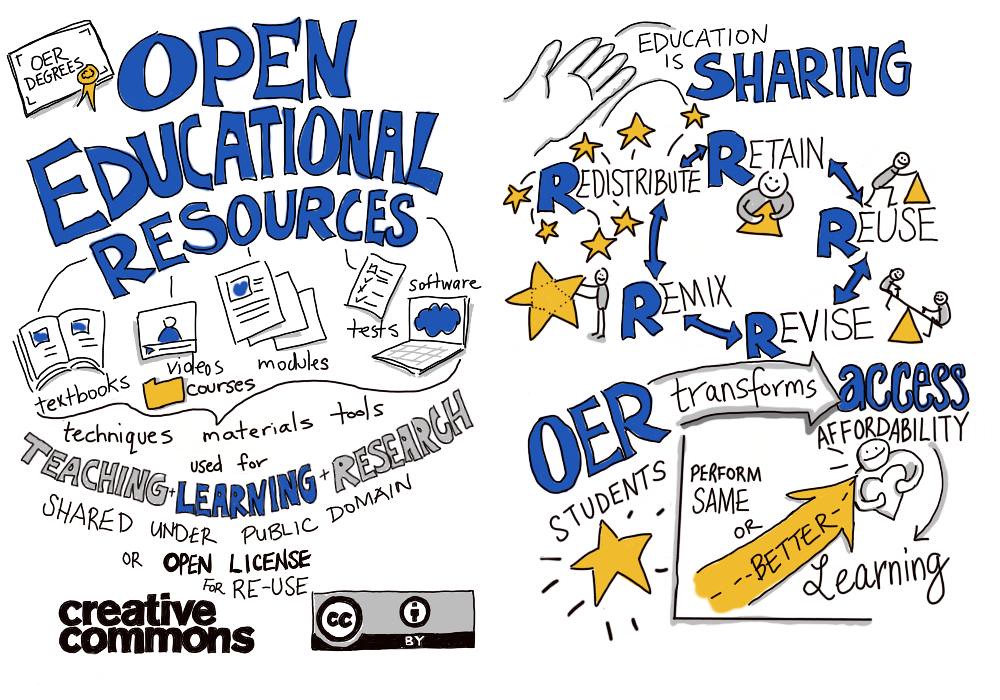
What is Open Educational Resources? The easiest way to describe this is free information, not copyright restricted, openly licensed text, images, or media that is useful for educational purposes. This applies to research, teaching, or learning. Some examples include open textbooks, videos, full courses, course materials, openly licensed, software and more. In today’s world of education OERs seem to be a normal way to teach especially when it comes to distant learning. Most of us have all copied an image and placed it in a paper like I have done below.
(Forsythe, n.d.)
I did not have to pay for this image, but it is necessary to provide where the image comes from due to copyright law regulations, but I will get back to that topic later.
Returning to OER there are 4 different levels of OERs:
1 – open, no cost access such as reading a textbook or watching a video
2 – free/open sources such as using a video or book to obtain a certification
3 – the right to modify and add additional resources
4 – taking the improved resource that was created and republishing.
With this being noted it brings us back to the copyright information. Creative Common Licenses have been created so that the originator keeps the original copyright to the material but allows others to copy, share, and add their own information as well which refers to OER4. There are several layers to the licenses for creative commons as well:
Attribution CC BY
Allows other to reorganize, change, build on, and redistribute works.
Attribution-ShareAlike CC BY-SA
Is the same as above but is used for commercial purposes and is ok as long as you are given credit for what is used.
Attribution-NoDerivs CC BY-ND
This one allows people to reuse our work, but it cannot be shared with others if changes are made. Credit is still given to your original
Attribution-NonCommercial CC BY-NC
This one lets others reorganize, change, and add on to work non-commercially and their new works must acknowledge the originator and be non-commercial, but does not have to license derivative works.
Attribution-NonCommercial-ShareAlike CC BY-NC-SA
Other people can reorganize, adapt, and build works non-commercially, as long as they give credit to you and then have to license their new creations
Attribution-NonCommercial-NoDerivs CC BY-NC-ND
The last one has more restrictions because it only allows information to be downloaded. This one cannot be changed or used commercially and there must be credit given to the originator.
(Creative Commons, 2017)
I know that this seems to be confusing but in order to use information found withing the open educational resource would it is important to understand what is allowed and what is not when it comes to supporting the future of knowledge and how to access it properly. To summarize Creative Commons License or cc is used when a person wants to give others the ability to share, use and build on their original work. I need to add that the big problem I see with this is that others can profit from your work if the correct license is not selected so which one to choose is important.
Moving on to Multi-Device and Mobile Learning. Today almost everyone has a mobile device attached to them at all times so we review how this device can help support formal learning. Mobile learning or mLearning is augmented learning since learning is on-demand and the environment adapts to the learner. (Quin, C.N. 2011). mLearning is not delivery of a course but being creative with access to information which helps to learn, problem solve and innovate what we see. The GPS is an excellent example of mLearning since it enables us to see in real world place and time to solve the simple question of where we are going.
The technology of devices has changed rapidly over the years and I am old enough to remember each one. From the Palm Pilot to the smartphone they were all used with a processor with running memory and it seems like the only thing that has changed is the technology behind them. When thinking about the readings one piece of formal learning seems to stick out when it comes to Mobil learning and that would be the 7 Cs of learning.
Choose what interests us
Commit to doing the work
Create by building experimenting and trying
Crash which means to fail, learn and try again
Copy by watching others and learning from them
Converse or discussing with others to seek out feedback
Collaborate again talk to peers about ideas
(Quin, 2011)
Mobile devices can help with the seven C’s, but I do not believe that they can replace real people. There is still a need for a facilitator to make learning successful. Only then can one truly see if comprehension of any topic exists otherwise all that is happening is another version of “knowledge dump” (Quin, C.N.2011) which in the classroom refers to “show up and throw up” information but updated to today’s world of technology which a version of download and go.
If one decides to use devices to help understand the world there are many ways to access the tools from sensors, apps, networking, even images but the real important view is content verses context. When it comes to mLearning it will be wonderful to get out of a classroom and participate in an activity where capturing a picture or opening a search engine to answer a question is possible but there is also a downside. Say we are on a field trip and there is no service, then what?
This video covers some myths about mobile learning.
Even though the video was made in 2015 it still seems to have relevant information today and refers to the same idea of content verses context.
This blog did not actually seem to fit from one subject to the next, but it was necessary to review what was addressed in the last two weeks of readings. Open Educational Resources are available to everyone that has a device to look them up whether a laptop or a smartphone. That is the only connection I can seem to make between the two units. The bottom line is technology is always changing and most of the access is free but remember to always cite what is being used for educational purposes to always cover yourself.
For my blog entry I would like to discuss topics explored in reference to Project Based Learning or PBL and the Flipped Classroom Learning. I will be reviewing some examples of each and how to apply them to a classroom setting.
What is project-based learning? My understanding is that a student understands and remembers more when there are hands on learning and not just lectures. PBL is filled with activities so students remain engaged in the subject and therefore remember more than just reading a book. It is my opinion that teachers may need more time to prepare when it comes to this type of learning which may be a negative However, since projects need to be created by the student, reviewed by the teacher, the class time is for questions which may reduce lesson prep time for educations. For students PBL may be more of an effective way to connect to what is being taught. My main question is then how do you asses if the subject was learned?
So why bother introducing project-based learning at all. Well, it is said that there are five keys to Rigorous to Project based learning.
Real world connections
Core to learning
Structured collaboration
Student driven
Multifaceted assessments
(Edutopia, 2014)
Lathram, B., Lenz, B., Vander Ark, T. (2016, Aug 23.)
I do agree with given the opportunity to create projects instead of being lectured to. I believe it encourages students to work together not only does this method help with communication skills, but it also gives the teacher the ability to change rolls and become more of an adviser instead of a lecturer. As long as there are questions that are proposed prior to beginning the project to help facilitate understanding and some sort of assessment tool then I can this form of education working successfully.
The idea of Project Based Learning has been around for a long time. John Dewey introduced this idea in the 1800’s (Edutopia 2014) and today it is most commonly used in the STEM programs. Project Based Learning helps with boredom. “A study by Yale’s Center researchers from the Yale Center for Emotional Intelligence and the Yale Child Study Center found that nearly 75% of the students’ self-reported feelings related to school were negative.” (Belli, 2020, para 2). It is my opinion the use of project-based learning may take away some of the negative feedback and make learning fun.
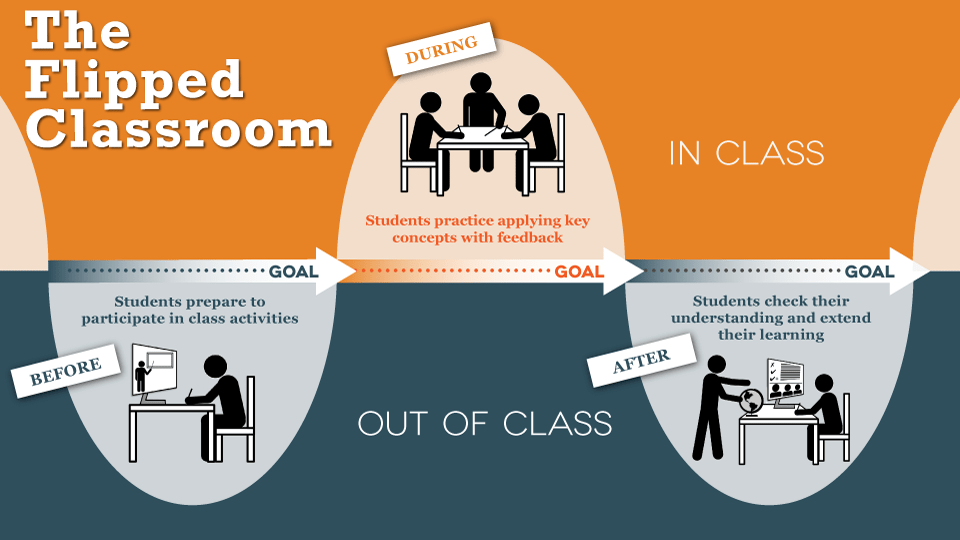
The second part of my Blog has to do with Flipped Classroom Learning.
Texas University Faculty Innovation Center, 2013
Unlike Project based where students work together in a classroom Flipped is when a student does most of the work at home and returns to the classroom with the completed work. The purpose of a flipped classroom is to allow brick and mortar time for questions and clarifications to work done at home and not just to sit in a room and be lectured to. There are pros and cons to this style of learning based on each individual person.
The following chart explains the differences between the two methods.
Traditional Classroom
Flipped Classroom
Classroom Role of teachers
Master of Knowledge and class
Instructor and simulator
Role of Students
Passive Learner
Active learner/researcher
Teaching methods in class
Teaching in class and doing homework after class
Pre-learning before class and discussing
Time distribution in class
Spending most of time in teaching
Spending most of the time discussing
Teaching contents in class
Teaching and imparting knowledge
Question-Answer study
Application of teaching methods
Presenting learning content
Autonomous learning and cooperative learning
Teaching evaluation
Paper test
Evaluation from multiple aspects
(Deng, 2019)
I prefer this type of learning if a student must go to a brick and mortar school. The flexibility of not only the teacher but the student is important and as previously stated from Yale helps change the image of what school is in today’s society and most importantly to avoid boredom. The most important thing to remember in this type of learning is how to include Bloom’s Taxonomy. There is an interesting video explaining how to create, evaluate, apply, understand and remember that reviews how to “flip” the order of the pyramid to relate to Flipped Learning.
This is not different from the original image of Bloom’s Taxonomy we are all use to seeing but what is different is that it is possible to start from the bottom of the pyramid and work up. I found this fascinating and it seemed to make perfect sense.
In conclusion, my personal preference is the Flipped classroom learning and Project Based Learning seem to go hand in hand together.
For my first blog under EDU 639 there will be a review of units 1, 2, and 3 in reference what was addressed and what was learned from the readings.
Beginning with Unit 1 and the trends in online learning there was an introduction to nowcasting for distant education which predicts what is going to happen 2 to 3 years away (Wilson, 2012). There were 5 key trends that are shaping distant learning, which were:
Advancing forms of knowledge, which has to do with how we learn to share new knowledge through free tools, apps, the cloud and the web.
Assessing Learning Achievements has to do with how to whether information has been learned and how future distant learning may be changed to outcome based assessments which would be based on the core RRR of reading writing and arithmetic but there may be issues with special needs groups as well as bilingual people and where does the arts fit into the assessment.
Making Learning Convenient and Accessible, speaks of how “remote learning is on the rise” (Wilson, 2012) and it is important to understand the pros and cons what the market place has to offer and who has the ability to use the technology.
Reaching all Learners, which was most important to me since I live in a diverse area where not everyone has WIFI in their home so the technology to succeed is not available to all. The moral dilemma is real when it comes to reaching all students which is something that has been addressed during Covid with hotspots being set up, but it still does not put technology in every household.
Engaging learners through Media and Design Experience. The last area of trends was the most informative when it comes to nowcasting since it addressed virtual reality, 3d imaging, high speed broad ban as well as social media. (Wilson, 2012).
It is my opinion that without the new emerging trends in education students would become bored.
The following video was from 2015 but seems to be incredibly accurate for 2020 as far as technology goes but the point of the video is to realize that even in 2015 the 5 key trends listed above were present.
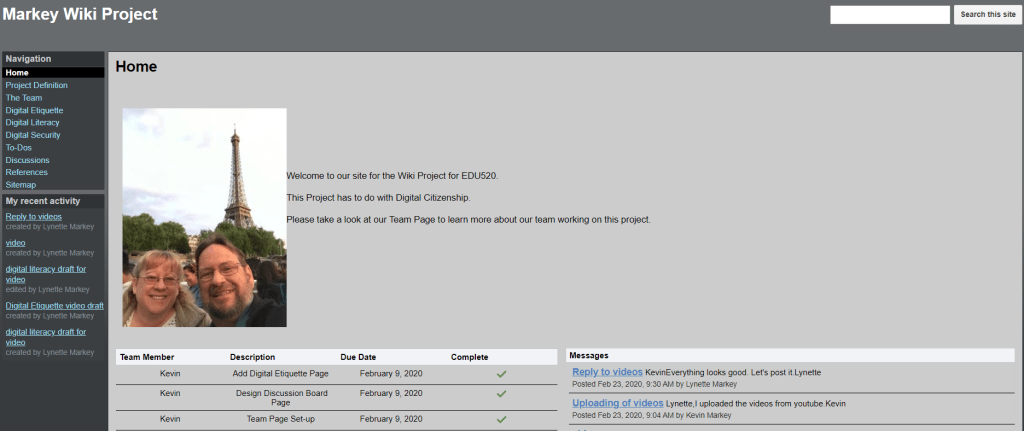
Unit 2 reviewed the Blended learning environment itself which focused on the use of Wikis which is a program that a user can freely create and edit a database similar to an LMS (Learning Management System). I personally have already used a Wiki for a previous class and found it to be a great example of blended distant learning. Students can use this program for a subject setup with collaboration within a group. There is the ability for feedback, questions, evaluations as well as group projects. I found it to be easy to use and was a nice way to work in a group however it is very easy to edit so access has to be restricted to an Editor.
This is what the site looks like:
(Markey & Markey, 2020)
Unit 2 also discussed blended learning models from Shea’s grounded model, McSporran and King blended learning method, as well as, Kahn octagonal model as well as rotational and flex models but there was so much information it was easy to get lost with all of the technical descriptions. What was most memorable from this area was the Rotation model which moved away from traditional brick and mortar to online within the classroom with stations that students move to throughout the day and rotate from class subjects. The flip side or Flex model is said to be the new way to learn. This is when a student moves at their own pace with an online curriculum this uses both technical and the teachers which are coaches, this seems to be the world we live which is a mix of how teachers are redeveloping the classroom with the combination of technology and face-to-face learning.
(Newman, 2019)
Unit 3 was about implementation of blended learning. The point was made that machines are available for information, but humans are still necessary for the emotional support. Both are needed to make blended learning work. There was a video referenced in this week’s activities, but it was from 2014 and spoke about iPod, really too old for todays trends. Mentions of downloaded textbooks and learning through technology seemed interesting but outdated. The best piece of information within week three came from the reading that answers questions about blended learning. The information included a video from the Modern Classroom Project which spoke about how teachers use the blended learning system and how students reacted to the change in curriculum.(Edutopia, 2019) Several points were addressed in reference to how the program works and how there is a reduction in anxiety due to a self-paced blended class. Learners are able to work in stations of video instruction, then to group activities where their peers help them to understand material and lastly take something called an exit ticket which is a mini quiz to see if the information was mastered. I believe this video could be viewed over and over. Each time you would see something new, and there is a section, under the video, that have most asked questions to help explain further how the program works (Farah & Barnett, 2019). To view the video please click on the following:
My opinion has always been that students should be self-paced and independent to the group. Teachers are valuable to help students to understand material and not just lecture so the blended trend of education works for the future.
References:
Al Jazeera (2015, Sep 16). 5 Technologies that will change classroom education . Retrieved from https://youtu.be/loFL5gT_m8I
Edutopia (2019, May 9) A student Centered Model of Blended Learning . Retrieved from https://youtu.be/zrR-KIoggf4
Wilson, B. G. (2012) Trends and issues facing distant education a Nowcasting exercise. Trends in Issues in Distance Education 2nd ed.: International Perspectives, Chapter 3. Information Age Publishing
For my final Blog for this class I would like to reflect on what I have learned and how I applied the teachings to real life without even noticing it. The three topics I chose to revisit are the mental representations of cognitive science, Perkins 7 Principles of learning and Bronfenbrenner’s Ecological system.
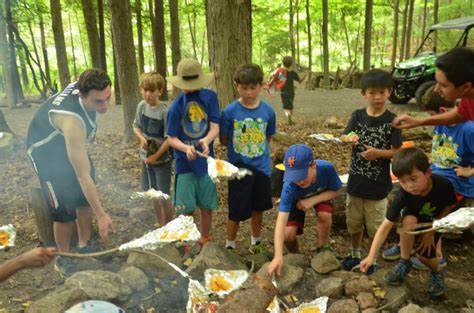
To begin I would like to point out that the mental representations, there are five and are used to help educators understand the mind and each one addresses questions. Logic addresses the if/then idea based on deductive and inductive reasoning. When I use logic when working with my beloved scout family the conversations usually work along the lines of if we wrap food in foil and place it on an open fire what do you think will happen. A simple example but pure logic sometimes escapes them, and many outcomes are usually suggested before they actually try the task. The second is Rules which are like logic in a way because there is still the if factor but then it becomes an action next. Since some of the scout’s already had done foil cooking “there way” before was it necessary to help them improve by realizing that there was more than one way but was it necessary for them to have this knowledge in order to succeed in this task or could they just listen to the rules. My believe as an educator is to find out why they had a certain knowledge of the task and to see if it needed to be improved on, not necessarily changed. OK that was a bit confusing but moving on to the next area of Concept which explains the ideas and mental image the scouts had in their head of what they needed to do. So, to go back to Rules concepts can be interpreted to rules. The knowledge known can be sorted differently and the concepts the same form into a procedure they understood. Both adults and youth can make their own decisions on whether what they have learned is useful this is all part of the cognitive process (Cherry, 2020). The simple foil pack example shows problem solving and open discussion on what is best to use and convince the group that their way was right.
The next area to cover under the mental representations is Analogies/cases and images each one seems to be a bit self-explanatory from the previous examples each one of the scouts had a visual image of what they expected and not just the eye type but also what they thought it was going to smell and taste like and they realized that not all thinking could be effective when applying it to the problem, or making a type of analogy to what they had seen before. This seems like so much information, but I did not understand that what the group was doing by way of the leaders teaching and they are learning was to go through the process of cognitive learning. This was my first AHA moment of the class.
(Gaddis, 2016)
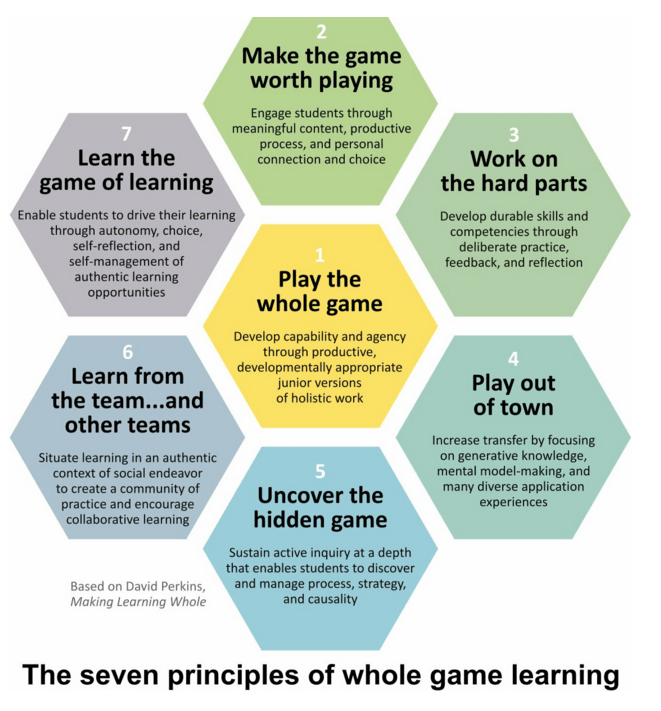
The second section I need to review is Perkins and his way of playing the whole game. I found this entire theory fascinating. I have already put much of this in my previous Blog so I will address this point in a short fashion.
(Calkins, 2016)
When I think about Learning the whole game (Perkins, 2009) it seems to cover so much of everyday life from my present job to teaching youth. Perkins theory covers a new piece of knowledge from beginning to end by way of moving through the natural progression or steps of learning. I believe his ideas make learning flow with the start of playing the whole game, which is a project-based event that goes through steps of learning to reach the ultimate goal of performing the task and committing it to memory. By creating a learning environment that makes learners want to keep playing along in the game and working through any parts that seem difficult and then being able to use those skills in another venue shows that Perkins theory works. Realizing that most people will have difficulty in a task is a way to uncover the hidden game or work on what went wrong when a task was used outside of learning. Sometimes it is a good idea to let scouts fail so they can ask for help from others and learn from others within their group or learn from the team. Once a group learns how to work out from beginning to end the task assigned, they have learned the whole game. It seems interesting to me how the Mental representations and Perkins seem to align with each other.
The last section I would like to review is Bronfenbrenner’s Ecological system. At first I was skeptical of his theory because we are trained as scout leaders to never look at anyone from where they came from or what they can afford but when it comes to learning I never could understand why some scouts managed to relate tasks to something they did with their family and others shied away from the conversation. It was not until I reviewed Bronfenbrenner that I understood a bit more about why.
Video
(Norris, 2017)
Without going into too much personal detail, some scouts do not have a parent available and grow up in not so nice areas so what they see culturally may not be the same as others within the group. Even though each individual is trained the same there may not be as much hands-on experience due to situation.
This Blog will be in reference to concepts and topics within information called “the game” and emotions that connect in social cognition as well as “the hard parts” within the game.
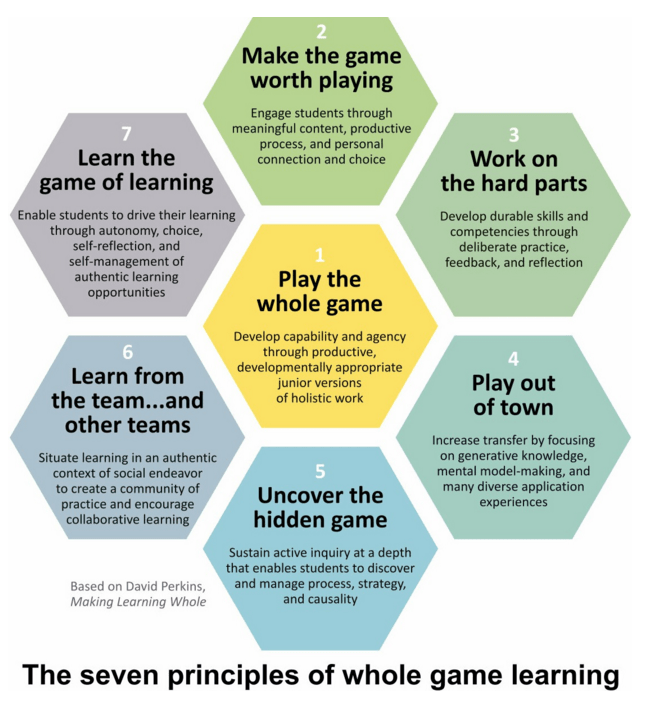
Perkins discusses 7 principles of learning to explain learning the whole game.
(Calkins, 2016)
So, what exactly is the game and how does it connect emotionally to learners. Perkins refers to this analogy as a way student learn about something new and how to get better at doing it working through the hard parts and not skipping them. Seems like a bit of a run-on sentence to let me break it down. Perkins uses Baseball but I would like to reference my own personal experience with a Boy Scout unit my husband and I worked with. The overall game was to earn your eagle scout award by learning different pieces of information with many harder lessons (hard parts) along the way. It was necessary to keep the youth motivated and engaged in each activity.
Week after week the scouts would come to a meeting and be given more pieces of information but since they were not actually using the information given, they really were not playing the game yet Perkins calls this Elementitis or lots of information. (Perkins, 2009) Even though it is necessary to learn all about what is needed to succeed if it is boring or there is no connection to the real world the students will lose interest. It is only when we take the information out on a camping trip when one sees if anyone understands any of the material. Can the scouts remember what they learned and act on it?
(Berman, 2012)
So, we are on the trip and we now see the inert knowledge at work. The scouts know it and can remember what was told but some can’t connect the information to the hands-on task there for making the skill a hard part which needs to be mastered. As leaders we now need to use an example called PFSST Pace, Focus, Stretch, and stick. “This is the momentum in the game” (Perkins, 2009, pg 464). It is necessary to work out the problems to avoid leaving anyone behind in learning.
Peers play in important part in learning the whole game. Leaders are great at giving information on their own experiences but when a peer gives the same details the emotional connection between scouts seems to be better received. As stated from Perkins “teaching for understanding is a way of making the game worth playing” (Perkins, 2009, pg 65).
I found if a person needs to work through something difficult (a hard part) it is best to observe to see if the task has been grasped. If not, then what? Is it necessary to start over? This seems to be a great time for an ongoing assessment analogy. Youth really want to hear positive things all the time. It is possible to work through the hard parts with corrective and positive words such as, for example, “that looks great, but have you tried this?” I found this to be very appreciated. Communication always seems to be the key. Perkins suggests dealing with hard parts has to do with the communication of 3 key elements of clarification, appreciation, concerns and suggestions. (Perkins, 2009). This allows for a check on what is going on with clear feedback from the Leader and some suggestions to help with motivation.
The bottom line is that as educators we hope that information conveyed is transferred to memory but not all people are going to understand the whole game. Some may not be able to take in skills learned to use elsewhere in life, but some will. What we teach needs to be useful later and how it is transferred to memory goes with Perkin’s idea that teachers need “to prepare people with skills, knowledge, and understanding for use elsewhere” (Perkins, 2009, pg 114).
References:
Berman, M. (2012, Apr 12). Cubs Scouts Pitching a Pup Tent Without Instructions . Retrieved from https://youtu.be/dO7k7LpFP7g
Within the first three units of the cognitive science of teaching and learning there has been many theories of teaching and how the brain learns as well as what strategies to use. This blog will be in reference to the area studied within the mind and the nature of its connections. There are 5 mental representations that will be reviewed within this blog with a short description of each. The next area to review will be the three most important implications based on what I understand in reference to how I learn.
The best way to begin is to remember that the brain is like a computer (Pathakar, 2011). But the most important thing to remember is that a computer does not have common sense and cannot understand emotions.
ComputerBrain
Software App thoughts
Operating systems memory and interpretations
BIOS perception centers
IC integrated circuits neural pathways
Transistors neurons
PN junctions synapse
(Pathakar, 2011)
With the chart being reviewed it implied that language is one of the mental organs carried out by the cognitive process like software in the computer operating system. Mental organ is like a concept. Today virtual assistants are being made to look and sound like humans and can help with a variety of things but cannot emotionally be real. Having said this it is necessary to understand how learners behave and what processes they use to be better than computers. Many people think that computers will replace humans someday, but individuals act without the help of others, but computers need a human to tell them to perform an action.
This seems like a lot of background information but in order to understand how the mental representations are used to assist scientists and educators I believe that it is necessary.
Mental representations means a message which is shown to the mind in the form of an idea or image,be broken down into 5 different categories, Logic, Rules, Concepts, Analogies/cases, and Images. Each one is used to understand the mind the following is a quick definition of how I understand each one without being complicated.
Logic: In the educational world it means If/Then which is found out by two different ways. Deductive reasoning (pure logic) and Inductive reasoning (a person is given choices)
Rules: Similar to logic but with a different meaning. If I pass the class, Then I will have one less class to graduate. If is the condition and then is the action.
Concepts: Is a mental image or abstract idea that I have put into words that I can use in real life.
Analogies/cases: Play a role in human thinking it is about problem making and decision making.
Images: visual ques that complement verbal representations.
To go a bit further into understanding how a person learns we need to toss in the word Synapse. The reason for this is because there is a parallel between computer processing and the neural connections in the brain. Simply put the when/where/and how we make connections when learning. Remember the above chart comparing the computer to the brain, this is where it makes more sense. The computer needs to be plugged in, push buttons, and have input while the brain has energy from glucose, no on off button and is always on taking in input. The area where the transfer is happing is a small gap between neurons called synapse.
Ok, confused yet? My next section connects it all together in how to relate this all to teaching styles and how to use them.
It is said that many learners have their own way of understanding material. There is even a quiz generated to find you own personal style (Felder & Soloman, n.d.). I personally believe this idea. If a person needs to be a hands-on learner, they are said to be Kinesthetic. If someone needs images, a visual learner. If an Auditory learner, they need to listen, but study may be repeating information out loud and of course there is some that are all three. When put together with the mental representations from above this all seems to make the mind a bit clearer. I believe to be a great educator it is necessary to have a concept in mind that can be logically figured out so it can be converted to images. In other words, a problem to be solved logically that can be put into a concept or idea that can be visually used later in life. The reasons I have chosen this way to teach is because this has been the best way, I have absorbed information during my educational journey. I learn very similar to Blooms Taxology. The video below sums this up best.
Patharkar, M. (2011). From data processing to mental organs: An interdisciplinary path to cognitive neuroscience. In: Brain, Mind and Consciousness: An International, Interdisciplinary Perspective (A.R. Sigh and S.A. Singh eds.), MSM, 9(1), p. 218-224.
Sprouts (2019, Jan 3). Blooms Taxonomy: Structuring the learning journey. Retrieved from https://youtu.be/ayefSTAnCR8
This weeks Blog assignment is in reference to crafting discussion board questions and the becoming the facilitator. This really does not feel any different then speaking in a weekly discussion board. There are numerous recommendations within the reading and material for this unit on what is an effective strategy that might be used to master facilitation, but most seems to be common sense.
I remember from grade school who, what, where, why, and how. Discussion board questions seem to follow the same pattern. What is the topic, who does it effect, what are we trying to accomplish, why and how do we get there. The only difference between the grade school and today is that after each posting a facilitator should pursue to further each answer with more questions. I understand that the purpose is to push a learner into critical thinking and look deeper into their answers, but the importance seems to be put more on backing up what you are saying with evidence.
The one reading did address common questions to avoid such as being too general or questions that are yes or no answers. The one I did not agree with is the general opening question such as what do you think? I believe this would open a dialog early, as long as the end of the sentence is back up your response. To be clear this nonquestion is listed under problems with opening questions because it is said to be to general and without any details to begin a conversation with. I believe if an online learner read the material and watched the videos then there is nothing wrong with beginning a unit with an open question. Not only would it provoke a great conversation to start the week, but it would force students to review the material if they did not understand the question.
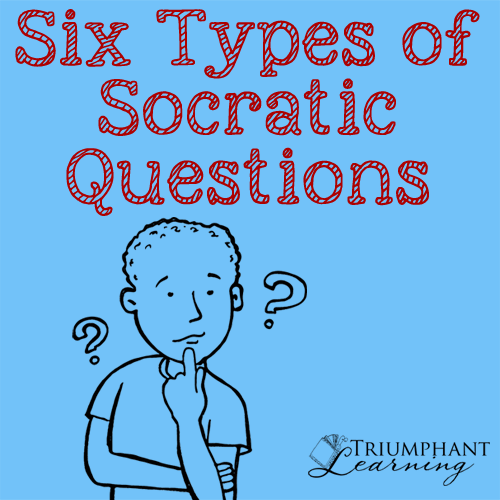
The key to a successful facilitator seems to be in the Socratic questions. The six major types of questions seem to be in each class I have taken through my journey in education, I just did not notice them until now.
Clarification – Why do you say that? Or How does this relate to our discussion board question?
Assumptions – How can you verify or disapprove assumptions
Probe reasons – Can you give an example or what do you think and why
Viewpoints and Perspective – What other way can you look at that?
Probe implications/consequences- What are you implying? How does that tie into what we have learned?
Questions about questions – Simply stated what do you mean?
(Paul, 1995)
There are many other resources to use to keep conversations flowing but I love to keep it simple. So far in reflection of this assignment I have enjoyed the links learners provide. I get a different viewpoint on a question that I may have missed the first time. The most important bit of information is learning how you word a discussion question may make perfect sense to you but in the eyes of another it may not be so clear.
The last two weeks of this course have been very busy. Unit 4 was on course development. Back in Unit 2 I began creating a mock course on How to Organize your Time as an Online Learner, Unit 4 developed the course further. Since the material that week included assessments, I added them to the course as well as activities. The discussion board always seems to be the best go to for an assessment tool and the others were a quiz as well as a paper. I did include a video in each week as well.
The readings within this week was helpful when it came to the tips of using videos. I learned that videos within a course should not be long, less then 5 minutes is recommended. Good to know since I love the use of videos. The second important factor in reading that week appeared in Palloff & Pratt, which states that student retention online depends on 3 factors:
Right student for the right program
Using highly learner-focused delivery models
Engaging at a personal level
(2013, pg. 23)
The reason why this was important is that if a course I am teaching is not engaging or boring and the learner enrolled has selected the wrong course for their major then chances are they will not succeed. According to Joyner, Fuller, Holzweiss, Henderson, & Young (2014), student-instructor connections are so important. If a student believes instructors are not engaged in the class, they are more likely to disengage from the class so not only is it important for the course to be interesting, but it is also true for the instructor as well.
Dreamstime.com (n.d.)
After all that is what educators want for our students, to succeed.
Unit 5 was in reference to promoting interactivity, simply it means how is a student interacting with the course successfully. There are 3 ways to create student engagement:
Student – Instructor: A good time to use technology to connect with some fun videos or in discussion boards review material and have some fun.
Student-Student: Peer discussions help with boredom. Create activities like group projects to keep engagement. Wiki projects are always a great way to connect students on a common goal.
Student-Content: This is for activities to see if the learner is understanding the material. Quizzes, papers, videos, blogs and many more are assessment tools used to see where a learner stands and if help is needed. Always ask for help if needed.
Academic Partnerships (2013, Apr. 19).
The last area to review is student-interface which is the promotion of interactivity to the learner through technology. Since we live in the age of technology it seemed to be the most interesting to review a bit further and this area is also mentioned within the area of student engagement. According to Don Norman’s video, User Centered Design, one line stuck out in my mind, Designers need to be less logical (Norman, 2013). Emotions play a part in design, if you hate it you won’t use it – FAIL. If the object is designed well, you will learn it once and use it. I relate this to the design of an online course. If the course is designed well, flows, and fun learners will want to explore to see what comes next. If it is designed poorly or boring, then students will not understand and ultimately not succeed.
The point of this Blog would be to make an online course that is engaging, easy to use and fun. Just a reminder don’t forget the videos and KISS!
Over the past three weeks I have been learning about designing and delivering information for an online course. The easiest way to review this is one week at a time so we will begin with week one on internet technologies.
The first week was a review of how the internet technologies directly applied to the online learner such as what makes a good course and the tools needed to teach them. The types of online technology were listed as the usual emails, videos, skype, blogs, wikis, discussion boards and more. The readings continued with the distant learner and how they understand material presented, this was interesting but offensive at the same time. The profile of the online learner seemed insulting to me. As an older student I found it interesting that the profile has changed from older, employed, place bound and goal orientated people who are motivated to learn to younger people who are diverse, dynamic, and respond well to changing technologies (Pallof & Pratt, 2013). Why can’t an older person also fit in this profile?
A few fun facts learned during the first week. First who owns a course that you design, do you or does the school? The answer is the institution you work for since you are “work for hire” personnel (Pallof & Pratt, 2013, pg. 15). This means whatever you put together to teach a class does not belong to you if you leave for another job. The second bit of information was a laptop is not considered a mobile device. In the eyes of technology cell phones, PDA’s, iPad, iPod are but why not a laptop? The answer is mobile devices are usually phones and desktops are computers. The laptop is somewhere in between but closer to a computer (Pallof & Pratt, 2013). Even though it is mobile it is not classified as a mobile device.
The second week moved away from definitions and started to discuss course design. The syllabus and what outcomes are expected were new to me but that was all. Since I had already created a mock course in Blackboard in EDU 632 the designing portion was a repeat of information. The syllabus was a new piece of information to incorporate into the mock course and it is important to remember that the grading criteria is broken down into percentages. It may seem unusual to point this out, but it needs to add up to 100% so double check your math.
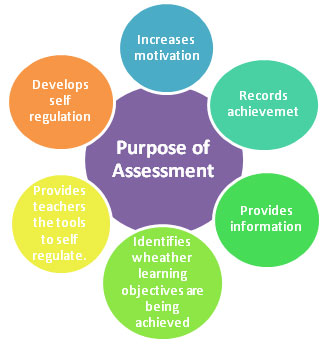
The third week was focused on assessing the online learner. How do you really know if someone understands material and what type of tools can be used. The way to see if a learner understands is through assessments. Everyone knows about quizzes and exams but there is so many other options. After reviewing the material in Chapter 8, I learned that knowledge surveys are possible before a class begins and again if needed halfway into the course (Vai & Sousulski, 2016). The survey is a self-assessment of the learner and not meant to be a test. Just helps to fill gaps in learning where needed. What a great idea, what do you think, do you think this should be added to every course? Not all online learners start in the same place. For example, I already created a mock course, but others may not have and may struggle with how to begin. Another type of assessment is peer-to-peer reviews. I have used this type before by submitting my PLE so others can view and give feedback, I just never associated it with an assessment tool.
Smith, C., Smith, G., Sonneveld, R., Sonter, J., & Suckling, M. (n.d.)
In future teachings I would love to be able to use more authentic assessments in the designing of online courses. The application of real-life performance tasks being applied to real life, such as this one in Blog form is something that needs to be incorporated more into course work. I am a firm believe that if it is meaningful to me and something I will use in real life; I will remember it.
This is my final Blog for EDU 632 Learning Management Systems. The past two weeks has had so much information to learn as well as building a Canvas course shell and comparing three LMS programs. I choose Blackboard, Canvas, and TalentLMS.
The creation of a mock class in Canvas was interesting and I really enjoyed the ease of the program. Since There was a comparison necessary for a PowerPoint presentation it was interesting to see how each LMS compared to each other. There is a link to the presentation if anyone wants to see it below.
To reflect on the piece of creating a Canvas mock module there were some interesting pieces of information learned. First, when signing up for the free test site to use it is necessary to sign in as an instructor not a student. Once into the program it was noted later that not all areas are available for use, so it is necessary to create videos in a separate blank page instead of a link. This is a small issue with this LMS after all it is a test site and not the paid for version. Second, the best feature is the ability to add, edit, grade, and create a syllabus being in one area. All pieces connect automatically. It is like creating a puzzle where all the pieces just fit. Thirdly, I just liked Canvas better then Blackboard.
Working with Talent LMS was just as easy as Canvas and had similar features. The only problem I noticed was that it was a relatively new LMS and I was a bit uneasy recommending this site since it is unclear how long it would be around. Unlike Blackboard and Canvas which is established Talentlms is not as old with the last update in 2019.
I have learned from this activity that Canvas seems to have moved passed Blackboard in reference to being selected as a schools LMS (Tate, 2018). I personally agree with this assessment. Blackboard has been the chosen LMS for Post for many years, but I really enjoyed Canvas.





 Lynette's Educational Journey